
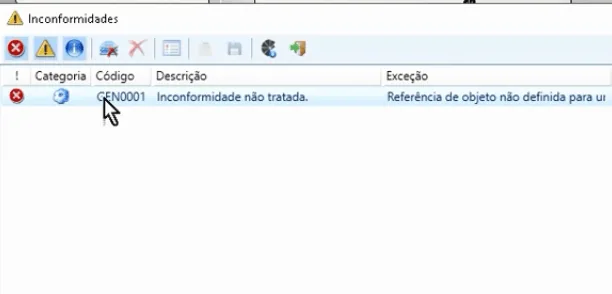
In my adventures, I discovered that the GEN0001 – Unhandled nonconformity error happens in many projects, and people often do not know how to solve it. After struggling a lot, I will list here the solutions I found, including one that worked for Promob 2019.
If you are using Promob 2017 or 2018, run the following procedure, the same one shown on the site:
- Close the program.
- Open C:\ProgramData\Procad\Promob(name)Repository.
- Find and delete the files named MaterialCache.
- Open Promob again and check whether the problem was solved.
If you are using Promob 2019, which was my working case, run this procedure:
- Close the program.
- Open Promob.
- Start a project from scratch, for example by clicking kitchen on the home screen.
- After it loads, click Modules > 3D Catalog and wait 1 to 2 minutes.
- Close the newly created project.
- Open the project that was showing the nonconformity.
If any of the procedures above solved the GEN0001 – Unhandled nonconformity error, leave a comment. We are happy to have helped. If it did not solve it, comment as well and we will do our best to help.
Comments
Join the conversation
Loading comments...